Origin Instruments logo

office (972) 606-8740
fax (972) 606-8741
email: support@orin.com
www.orin.com

Software Essentials for Windows Computers


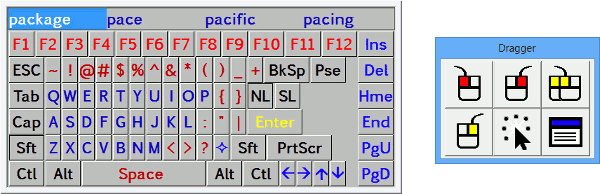
Screen shot of SofType and Dragger

SofType™

SofType is a software utility which replaces the functionality of a standard keyboard with a full featured on-screen keyboard. SofType can be accessed using a mouse or mouse emulator such as the HeadMouse® Extreme. SofType is compatible with Windows XP, Vista and Windows 7. SofType works by generating an image of a keyboard on the computer screen. When a key is selected, the character represented by that key is sent to the active Windows application.

SofType has a built-in dwell selection feature called AutoClick™. When AutoClick is enabled, clicking functions are performed by holding the pointer motionless (dwell) for a programmable length of time. Dragger™ is a toolbar integrated into SofType which allows AutoClick and single-switch users to perform all of the common clicking functions of a two-button mouse. Specific buttons on the Dragger toolbar are associated with the common clicking functions.

Word Prediction eliminates keystrokes when words are selected from the word list. As you begin to type, a list of words is displayed in the Word Bar, which match the spelling of the word you type. When your word appears in the list, simply select that word. This feature will automatically complete the word and add a space at the end.

SofType offers a variety of keyboard layouts ranging from a very basic keyboard such as the Kidkeys layout to a more comprehensive keyboard such as the Qwerty layout. It is also possible to create your own keyboard layout by using a text editor to edit an existing layout. More SofType 4.2 information...

SofType 4.5 has the same capability as SofType 4.2 with the added capability to accommodate English and other languages. More SofType 4.5 information...

Dragger™

Dragger is a utility for manipulating the left and right mouse buttons of a standard mouse or mouse emulator, like the HeadMouse Extreme. Dragger can be used to enter mouse clicks by movement and dwell of the on-screen mouse pointer. This dwell selection function is known as AutoClick™. When enabled, AutoClick watches the pointer and clicks the left mouse button when the pointer is brought to rest for the programmable dwell time. If the pointer remains motionless it will not click again. Using the Dragger toolbar this single left click can be turned into a Double Click, Right Click, or Left and Right Drag.

Dragger is built into SofType, but is available as a separate utility. More Dragger information...


How to Purchase

Click here to buy Windows Software


Related Products


HeadMouse Extreme

Click here for more information about HeadMouse Extreme

Click here for Apple Macintosh Software


iPad, iPhone, and iPod touch Apps


Proloquo2Go logo